Штампана Азбука - Printed Azbuka
The Cyrillic script is the official script of Serbia and is used in government documents, official publications, and formal communication. It consists of 30 letters, each representing a specific sound in the Serbian language. The Cyrillic alphabet was developed in the 9th century by Saints Cyril and Methodius, who were Byzantine missionaries. It has since undergone several modifications to suit the phonetic needs of the Serbian language.
Watch the video below to learn more about the Serbian Cyrillic alphabet.
Писана Азбука - Cursive Azbuka
Cursive writing is a style of penmanship where the letters are connected in a flowing manner, often for the purpose of making writing faster. In Serbian, both Cyrillic and Latin scripts have their own cursive forms. Cursive writing is commonly taught in schools and used in personal correspondence.

Štampana Abeceda - Printed Abeceda
The Latin script is widely used in Serbia, especially in informal communication, media, and advertising. The Latin alphabet was introduced in the 19th century and has become increasingly popular due to its simplicity and ease of use in digital communication.
Watch the video below to learn more about the Serbian Latin alphabet.
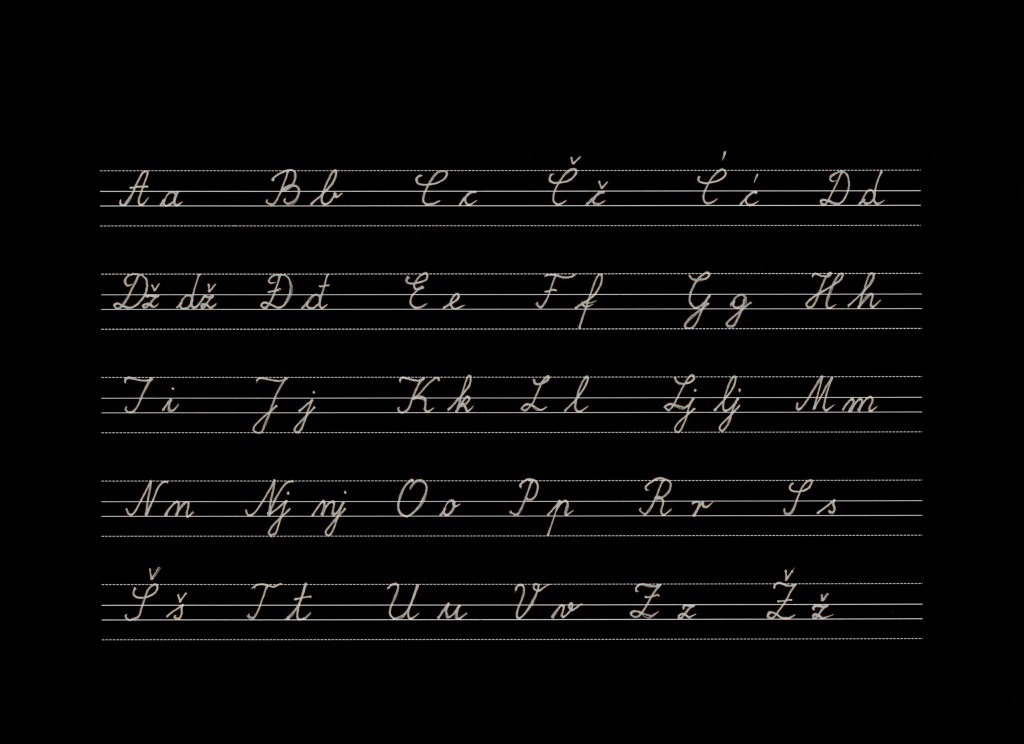
Pisana Abeceda - Cursive Abeceda
Cursive writing is a style of penmanship where the letters are connected in a flowing manner, often for the purpose of making writing faster. In Serbian, both Cyrillic and Latin scripts have their own cursive forms. Cursive writing is commonly taught in schools and used in personal correspondence.
Keyboard Layouts
Setting up a Serbian keyboard layout on your device allows you to easily type in both Cyrillic and Latin scripts. Below are instructions for setting up Serbian keyboard layouts on various operating systems and devices.
MacOS
- Go to System Preferences > Keyboard > Input Sources.
- Click the "+" button and select "Serbian" from the list.
- Choose the desired keyboard layout (Cyrillic or Latin) and click "Add".
- You can switch between keyboard layouts using the input menu in the menu bar.
iOS
- Go to Settings > General > Keyboard > Keyboards.
- Tap "Add New Keyboard" and select "Serbian".
- Select the desired keyboard layout (Cyrillic or Latin).
- You can switch between keyboards by tapping the globe icon on the keyboard.
Windows
- Go to Settings > Time & Language > Language.
- Click on "Add a language" and select "Serbian".
- Choose the desired keyboard layout (Cyrillic or Latin) during the installation process.
- Once installed, you can switch between keyboard layouts using the language bar in the taskbar.
Android
- Go to Settings > System > Languages & input > Virtual keyboard.
- Select your keyboard app (e.g., Gboard) and go to Languages.
- Add "Serbian" and choose the desired keyboard layout (Cyrillic or Latin).
- You can switch between keyboards by tapping the globe icon on the keyboard.
Linux (Ubuntu)
- Go to Settings > Region & Language.
- Click the "+" button under Input Sources and select "Serbian".
- Choose the desired keyboard layout (Cyrillic or Latin) and click "Add".
- You can switch between keyboard layouts using the input menu in the top bar.
 Cyrillic
 Latin
Latin Keyboard layouts